בסיס ידע

How to Remove a Database User in Plesk

In this tutorial, you will learn how to remove a database user in Plesk.

1. Log in to your Plesk account.

2. Click on Databases from the Sidebar Menu.
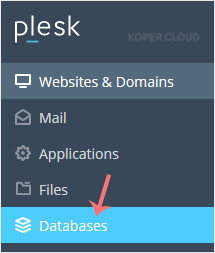
plesk-database-menu.gif

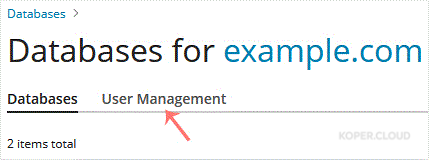
3. Click on User Management tab.

plesk-database-user-management-menu.gif

4. Under Database Users, checkmark the appropriate database user you want to remove and click on Remove.
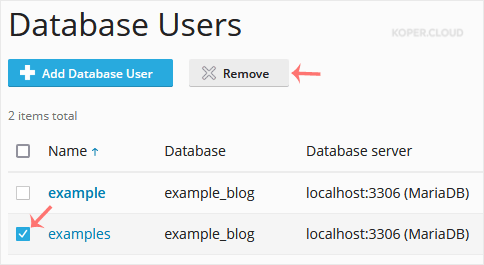
plesk-remove-database-user.gif

5. A confirmation box will appear. Confirm with Yes to remove the user.

The database user has been successfully removed in Plesk.

  • 0 משתמשים שמצאו מאמר זה מועיל

?האם התשובה שקיבלתם הייתה מועילה

מאמרים קשורים

How to Create a Database in Plesk

You can create a database in Plesk by following this tutorial. 1. Log in to your Plesk...

How to Delete a Database in Plesk

In this tutorial, you will learn how to delete a database in Plesk. This is helpful when the...

How to Download a Dump of a Database in Plesk

You can generate a backup of your database and download it to your computer using Plesk. 1....

How to Create a New Database User in Plesk

In this tutorial, you will learn how to create a new database user in Plesk. 1. Log in to...