
Bilik bazası

How to Update the Email Address of a Scheduled Task in Plesk

Follow this tutorial to update the email address of Scheduled Tasks (Cron Jobs) in Plesk.

1. Log in to your Plesk account.

2. Click on Websites & Domains from the Sidebar Menu.

plesk-websites-and-domains-menu.gif

3. Click on the Pull icon in the right sidebar and choose Scheduled Tasks.
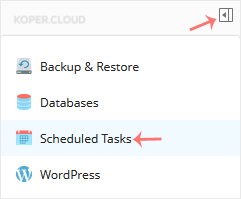
plesk-scheduled-task-sidebar-menu.gif

4. Under the Command list, locate your task and click on it.
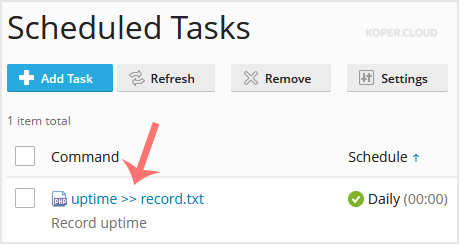
plesk-task-edit.gif

5. Scroll down to the Send notifications, choose other users, and update the email address.
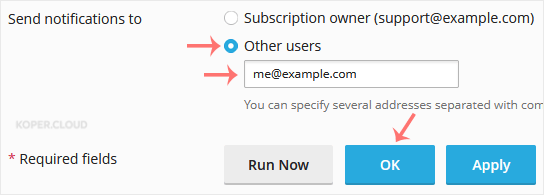
plesk-scheduletalk-email-update.gif

6. Click OK.

Note: If the Send notifications to option is not available, choose Every time or Errors only under Notify to enable it.

  • 0 istifadəçi bunu faydalı hesab edir

Bu cavab sizə kömək etdi?

Uyğun məqalələr

How to Edit a File in the Plesk File Manager

Learn how to edit a file directly in the Plesk File Manager. This is useful for making quick...

How to Log in to Plesk

A tutorial on how to access the Plesk Control Panel. After you place an order and make a...

How to Change the Password of a Plesk Account

Follow these steps to change your Plesk account password. 1. Log in to your Plesk account....

How to Reset a Plesk's Account Password

Follow these steps to reset your Plesk account password. 1. Open your Plesk login URL. 2....

How to Update a Plesk Account's Email Address

Follow these steps to change your Plesk contact email address. 1. Log in to your Plesk...