
Bilik bazası

How to Enable Isolated Domain Views in Plesk

In Plesk, you can simplify domain management by enabling Isolated Domain Views. This feature ensures each domain opens on a separate page, allowing you to focus on one domain at a time, free from distractions or the risk of mistakes when managing multiple domains.

1. Log in to your Plesk account.

2. Click Websites & Domains from the Sidebar Menu.
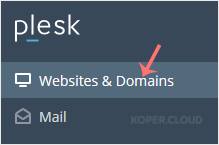
plesk-websites-and-domains-menu.gif

3. Click on Set View on the right side and select the On a Separate Page option.
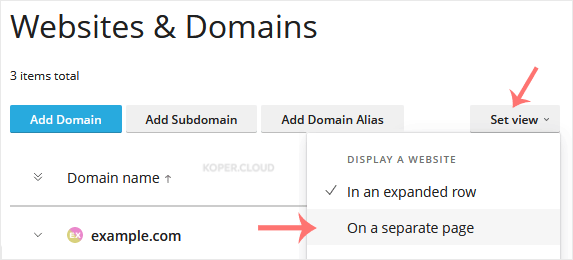
plesk-view-mode-in-dynamic-list.gif

Turning on Isolated Domain Views in Plesk helps you stay focused and prevents mistakes, like accidentally changing or deleting files in the wrong domain when working with multiple sites.

  • 0 istifadəçi bunu faydalı hesab edir

Bu cavab sizə kömək etdi?

Uyğun məqalələr

How to Edit a File in the Plesk File Manager

Learn how to edit a file directly in the Plesk File Manager. This is useful for making quick...

How to Log in to Plesk

A tutorial on how to access the Plesk Control Panel. After you place an order and make a...

How to Change the Password of a Plesk Account

Follow these steps to change your Plesk account password. 1. Log in to your Plesk account....

How to Reset a Plesk's Account Password

Follow these steps to reset your Plesk account password. 1. Open your Plesk login URL. 2....

How to Update a Plesk Account's Email Address

Follow these steps to change your Plesk contact email address. 1. Log in to your Plesk...